This section contains use cases and scenarios to help you implement the Policies API.
The diagram below shows how a property with the following resources can create 3 or more roomrates:
- 2 room types
- 2 rate plans, and
- 2 policies
Note that the property has created 3 roomrates each with a combination of room type, rate plan and a cancellation policy. You can specify any combination of existing room types, rate plans and cancellation policies to create more than one roomrate.
- To create a room type, use the OTA_HotelInvNotif endpoint
- To create a rate plan, use the OTA_HotelRatePlanNotif endpoint
- To create a roomrate and assign a policy to it, use the OTA_HotelProductNotif endpoint
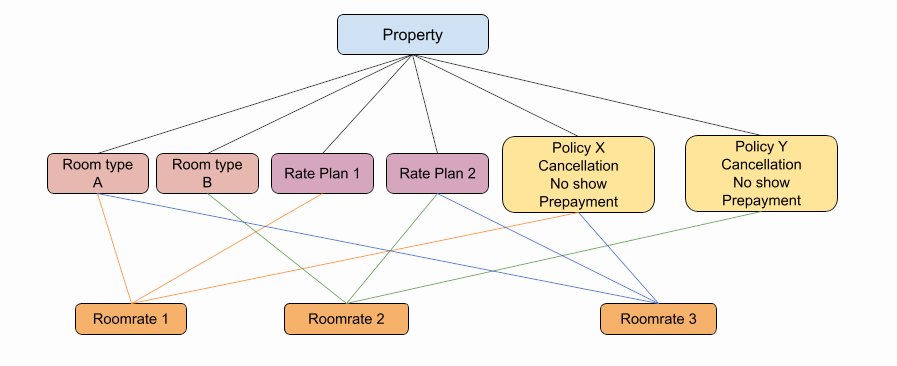
Figure 1. A simplified view of how room type, rate plan and policy interact to create a roomrate.
Policies are assigned on the roomrate level using a policy ID. When creating a roomrate, you must select an existing room type, rate plan and a policy (if you do not want the API to assign the default policy).
The Policies API enables you to change the details of a policy even when it is assigned to a roomrate. After the change, the roomrate uses the updated policy rules. The following figure shows how changing a policy impacts the existing roomrates with the policy assigned to them.
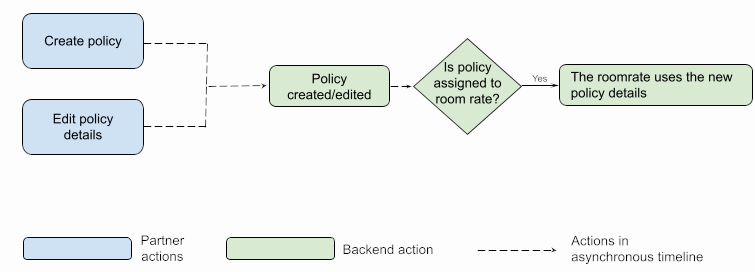
Figure 2. Actions on a policy.
If you have questions or suggestions for improvement, please feel free to contact us.
→ To create a policy, see Creating a policy.
→ To modify policy details, see Changing policy details.