This guide presents scenarios for group guest allocation, occupancy, and related policies, explaining how to retrieve, display, and interpret these use cases through our Demand API.
The examples below cover common accommodation scenarios with different group sizes, age distributions, and room allocations.
Each use case includes:
- A request and response sample.
- Explanations and best practices.
These help you implement correct allocation, pricing, and occupancy handling.
Two family groups are planning a holiday in Marbella, Spain (city id -391076). They would need 1 room, for:
- 2 parents with 2 children (ages 2 and 10).
- 2 parents with 3 children (ages 0, 5 and 14).
In this case, the travellers do not allocate guests to specific rooms but specify the need for 1 room in the guest.number_of_rooms field.
Call the search endpoint including in request:
guests.number_of_adults- 4guests.children- specify full children ages array.guest.number_of_rooms- set to 1.
{
  "booker": { ... },
  "cancellation_type": "free_cancellation",
  "checkin": "2025-02-13",
  "checkout": "2025-02-16",
  "city": -391076,
  "currency": "EUR",
  "extras": [
    "extra_charges",
    "products" // pass this extra, so child policy is returned in response.
  ],
  "guests": {
    "number_of_adults": 4,
    "children": [ // This is the full children ages array.
      0,
      2,
      5,
      10,
      14
    ],
    "number_of_rooms": 1
  }
}
Because no per-room allocation is provided, the guests.allocation field is not included in the request.
Same group now requests multiple rooms:
- Room A 2 adults + 2 children (2,10)
- Room B for 2 adults and 3 children (0,5,14).
Use the guests.allocation in accommodations/search request to specify which guests go to which room.
{
  "guests": {
    "allocation": [
      {
        "number_of_adults": 2, // This is room A
        "children": [2, 10]
      },
      {
        "number_of_adults": 2, // This is room B
        "children": [0, 5, 14]
      }
    ],
    "number_of_adults": 4,
    "children": [0, 2, 5, 10, 14],
    "number_of_rooms": 2
  }
} If guests want contiguous rooms, suggest using the special_request field when creating the order.
This allows guests to communicate with the property about their preference for room proximity.
Example of order/create call with "special request":
{
  "accommodation": {
    "label": "Sample label",
    "products": [...]
  },
  "remarks": {
    "estimated_arrival_time": {
      "hour": 12
    },
    "special_requests": "We would like to have the two rooms together."
  }
}
For more details about special requests, see the orders/create guide.
A single-parent family with multiple children is seeking availability in a family hotel (Hotel id: 9897851) in Spain:
- 1 adult + 2 children (aged 7 and 9).
- 1 room.
- Checkin: 2026-02-13
- Checkout: 2026-02-14
Ensure at least 1 adult accompanies children. Show an error if 0 adults are submitted.
→ Use the accommodation availability endpoint to get real-time occupancy, pricing, and allocation for the selected accommodation.
To meet these requirements:
- Include the selected
accommodationID to return actual availability and prices. - Specify the
guest.number_of_roomsparameter (in this case, 1 room). - Set the
guests.number_of_adultsto include the total number of adults (in this example 1). - Use
guests.childrento list the ages of the children (7 and 9).
{
  "accommodation": 9897851,
  "booker": { ... },
  "checkin": "2026-02-13",
  "checkout": "2026-02-16",
  "guests": {
    "number_of_adults": 1,
    "children": [7, 9],
    "number_of_rooms": 1
  }
}
For some products, the maximum occupancy.children field may be null. This indicates, the absence of child rates.
Scenario: For the following family group:
- 2 children (4 and 8 year old).
- 2 adults.
- And 2 rooms.
Steps:
- Call the accommodations/search with guest details.
{
  "accommodations": [430741],
  "booker": { ... },
  "checkin": "2025-07-27",
  "checkout": "2025-07-29",
  "guests": {
    "number_of_adults": 2,
    "children": [4, 8],
    "number_of_rooms": 2
  }
}
- Call the accommodations/availability endpoint with
guests.allocation:
{
  "guests": {
    "allocation": [
      {
        "number_of_adults": 1,
        "children": [4]
      },
      {
        "number_of_adults": 1,
        "children": [8]
      }
    ],
    "number_of_adults": 2,
    "number_of_rooms": 2,
    "children": [4, 8]
  }
}
The accommodations/search response suggests that the room can accommodate:
- 2 adults + 2 children (total occupancy: 4), with a maximum of 3 adults.
However, the accommodations/availability response provides a different interpretation:
- The maximum occupancy for adults is 3 + for children is 1 (total occupancy remains 4).
Both endpoints apply the same restrictions on adult and child occupancy.
However, because the /search request includes 2 adults + 2 children (exceeding the maximum number of children allowed), the response adjusts by counting 1 child as an adult to fit the accommodation’s limitations.
It provides the result as if the total number of people is 3 adults (with 1 child counted as an adult) and 1 child in the room.
Tip: Surface a specific message in your UI such as: “Only 1 child eligible for child rate; 1 child will be charged as an adult.”
For a group of 2 adults + 3 children, the accommodations/availability response shows:
- A maximum of 4 adults + total room's maximum occupancy of 5 (Maximum occupancy > Maximum Adults).
- That means the extra slot may be used by a child.
- However, up to 3 children could potentially fit in this room, as long as the total occupancy limit of 5 is not exceeded.
{
  "products": [
    {
      "id": "43074105_397810739_0_0_0",
      "commission": { ... },
      "deal": { ... },
      "maximum_occupancy": {
        "adults": 4,
        "children": [
            {
              "total": 1,
              "from_age": 0,
              "to_age": 5,
              "free_stay": false
            }
          ],
        "total": 5
      },
      "number_available": 1,
      "policies": { ... }
    }
  ]
}
In terms of pricing, since the maximum_occupancy.children is set to 1:
- Only 1 child will be charged at the child rate.
- The remaining 2 children will be charged as adults.
Multi-room allocation exceeding capacity triggers occupancy_mismatch. Example of orders/preview response:
{
  "occupancy_mismatch": {
    "allocated": [{"room_id":123, "adults":2, "children":1}],
    "unallocated": [{"adults":0,"children":1}]
  }
}- Allocate guests according to maximum_occupancy to avoid preview errors.
- Always reconcile /search vs /availability.
In this example:
- The maximum number of adults is 4.
- The
maximum_occupancy.totalis set to 5. - And the
maximum_occupancy.childrenis also 5.
{
  "products": [
    {
      "id": "43074105_397810739_0_0_0",
      "commission": { ... },
      "deal": { ... },
      "maximum_occupancy": {
        "adults": 4,
        "children": [
            {
              "total": 5,
              "from_age": 0,
              "to_age": 12,
              "free_stay": false
            }
          ],
        "total": 5
      },
      "number_available": 1,
      "policies": { ... },
      "price": { ... },
      "room": 43074105,
    }
  ]
}
Under this configuration all children will be charged child rates, as the maximum_occupancy.children matches the maximum_occupancy.total, allowing the full capacity of children to stay at the property at a special rate.
When querying the accommodations/availability endpoint for a selected accommodation, and including children in the request, the response may return products where the maximum_occupancy.children field is null.
- If
maximum_occupancy.childrenisnullthe property does not expose child bands, treat children as adults for pricing.
Example of response:
{
  "id": "989785107_371605558_2_1_0",
  "deal": null,
  "maximum_occupancy": {
    "adults": 2,
    "children": null,
    "total": 4
  }
}
Some properties may restrict stays to adults.
When checking availability in an "adults only" accommodation, with children included in the guest list:
- Hotel ID: 91556
- 2 adults + 2 children, aged 8 and 10
- 1 room, with no allocation.
Example request:
{
  "accommodation": 91556,
  "booker": { ... },
  "checkin": "2026-02-20",
  "checkout": "2026-02-25",
  "guests": {
    "number_of_rooms": 1,
    "number_of_adults": 2,
    "children": [8, 10]
  }
}
Availability response may might hint that children are not accommodated, for example returning maximum_occupancy.children: null or/and recommendation: null, but these are not guaranteed indicators of an adults-only hotel.
The only reliable source of truth that a property is adults-only is the minimum_guest_age field returned by the /accommodations/details endpoint. If the minimum_guest_age ≥ 18 the property is adults-only.
Example availability response:
{
  "request_id": "01j9nns58j6mxc0htwj5wcpd3q",
  "data": {
    "id": 91556,
    "currency": "EUR",
    "deep_link_url": "booking://hotel/91556?affiliate_id=xxxx&checkin=2026-02-13&checkout=2025-02-14",
    "products": [
      {
        "deal": null,
        "maximum_occupancy": {
          "adults": 3,
          "children": null,
          "total": 3
        },
        "number_available_at_this_price": 2,
        "policies": { ... },
        "price": { ... },
        "total": 120.00,
        "room": 9155610
      },
      {
        "id": "9155610_88154438_0_0_0",
        "commission": { ... },
        "deal": null,
        "maximum_occupancy": {
          "adults": 3,
When looking for family- friendly accommodation, and wishing to exclude "adults only" properties from your results, we recommend the following steps:
Call the /accommodations/details endpoint.
Check the
minimum_guest_agefield within thepoliciesobject:- This field indicates the minimum age required for to stay at the property.
Verify whether the minimum allowed age is 18 (children are considered to be by default between the ages of 0 and 17, inclusive).
minimum_guest_age ≥ 18→ property is adults-only.minimum_guest_age < 18→ children below this age are not allowed, but the property is not classified as adults-only.minimum_guest_age = 0→ guests of any age are allowed; property is not adults-only.
For example, if a property has minimum_guest_age: 17, you should exclude it from searches involving children:
{
  "policies": {
    "cots_and_extra_beds": [...],
    "damage": { ... },
    "maximum_checkin_age": null,
    "minimum_checkin_age": 17,
    "minimum_guest_age": 17,
    "pets": {...}
  }
}
If the minimum_age is set to "0", guests of any age are allowed in the property, and the property is not classified as "adults only".
Using the orders/preview endpoint to book an "Adults-only" accommodation with children included in the guest list, returns an error indicating that children are not allowed at the property.
Some properties set specific age restrictions for children. For instance, a property may have a minimum_guest_age policy that limits the age of children allowed to stay.
Example:
A family group is looking availability in an already known property in Madrid that is children-friendly. The accommodations/availability request includes:
- Accommodation id: 430741.
- 2 adults.
- A 2 years old child.
- They need 1 room.
Include the guests information in the request:
{
  "accommodations": [430741],
  "booker": { ... },
  "checkin": "2025-08-27",
  "checkout": "2025-08-28",
  "guests": {
    "number_of_adults": 2,
    "children": [2],
    "number_of_rooms": 1
  }
}
The reason why there are no recommendations is due to the age restrictions set by the property.
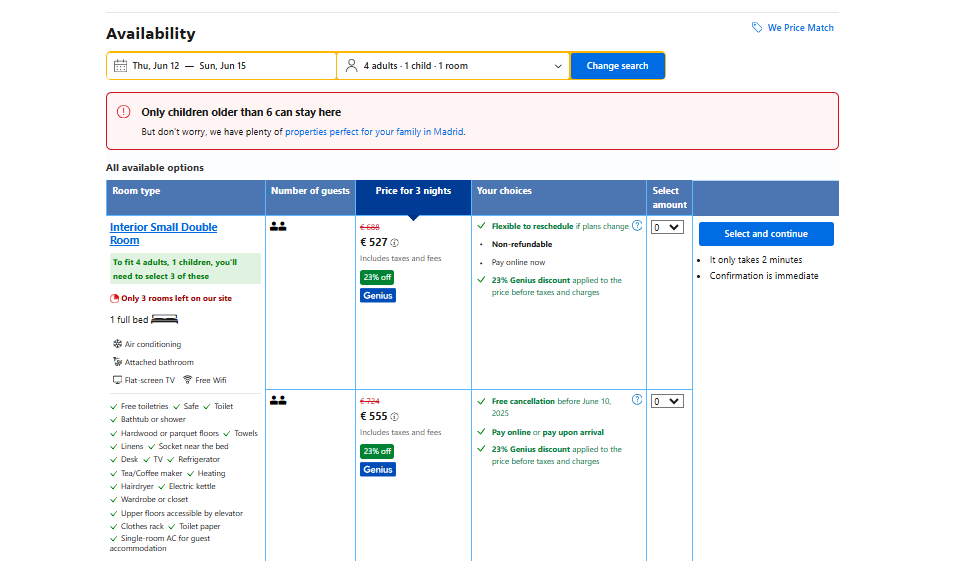
In order to verify the applicable age restrictions set by the property:
Call the /accommodations/details endpoint using the same guests information and accommodation id (430741)
Under the
policiesobject, check theminimum_agefield in the response.
{
  "policies": {
    "maximum_checkin_age": null,
    "minimum_checkin_age": 18,
    "minimum_guest_age": 6,
    "pets": { ... }
  }
}- In this example, the minimum_age has been set to 6, therefore the 2 years old child is not allowed to stay in this property.
- Repeat again the accommodations/availability call for the same number of guests and accommodation but changing the children age to 6 years old.
Once the child’s age is adjusted to 6, the property returns valid results with child rates (if available) and the recommendation field with the best possible options for the family group, including children.
Some properties allow children to stay free of charge. This is indicated by the free_stay boolean field under the policies object in the accommodations/availability response.
A family with 2 adults and 1 child (aged 4) checks availability. The room has a child band (0-5) and free_stay:true.
{
  "accommodation": 27635,
  "booker": {
    "country": "nl",
    "platform": "desktop"
  },
  "checkin": "2025-09-10",
  "checkout": "2025-09-12",
  "guests": {
    "number_of_adults": 2,
    "children": [4],
    "number_of_rooms": 1
  }
}
To retrieve information about cots and extra beds, you should call the /accommodations/details endpoint and specify the extras parameter with the rooms option.
The "cribs and extra beds" option is deprecated. Use "cots_and_extra_beds" instead.
Use the following filters in your request:
- Accommodation id
- Extra parameter: "rooms" to retrieve the room details.
{
  "accommodations": [27635],
  "extras": ["rooms"],
  "languages": ["en-gb"]
}
✅ Always capture request/response for debugging.
✅ Verify allocation vs maximum_occupancy for adults and children.
✅ Handle occupancy_mismatch gracefully.
✅ Show clear pricing messages when guests exceed allowed slots.
✅ Cross-check /search vs /availability before confirming bookings.
- See the child policies section - For detailed information on occupancy, allocation for child rate policies.
- Refer to the Troubleshooting section - To identify and solve possible errors.
- Check the Accommodation search guide - For best practices on using the accommodation search and availability endpoints.