# Static data

**Optimise your integration by storing car rental information that rarely changes.**

Some car rental endpoints return static data — information that remains consistent over time, such as vehicle specifications, supplier details and depot locations.

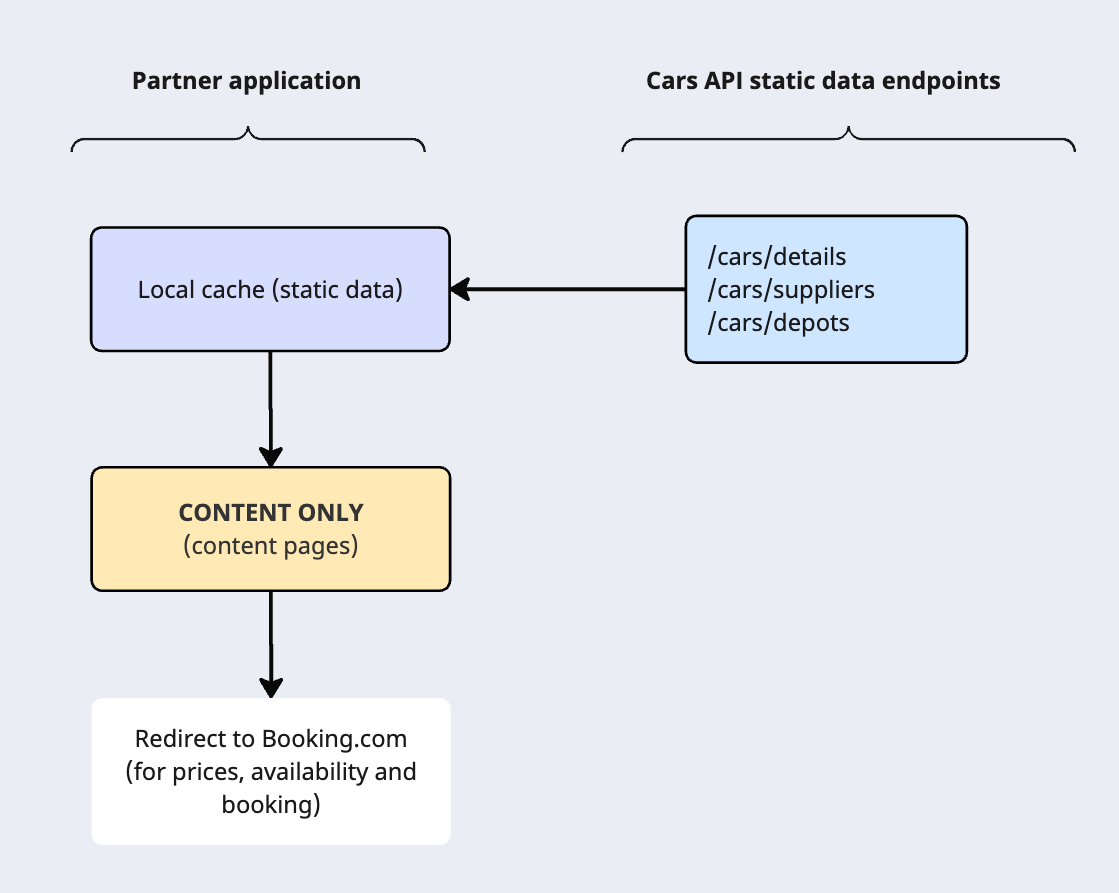
To ensure fast response times and a smooth traveller experience, **we recommend storing static data locally and refreshing it frequently or when updates occur**. This approach reduces API calls, minimises latency, and improves reliability across your car content, search, look and redirecting flows.

## Why store static data?

* Reduces API calls and server load.
* Ensures faster page loads for travellers.
* Supports smoother UI experiences for search results and car detail pages.
* Allows local filtering and display without repeated network requests.


## Recommended storing practices

✓ Store the response from static endpoints in your local system.

✓ Serve stored details in subsequent user requests.

✓ Update the stored data periodically or when relevant changes occur, e.g., new images, updated specifications, or availability changes.
![static data caching](/assets/getting-started-2.6e6c20da4ba31f9db31ee69953993623524599a849f0635df84961cba7dd12ec.8d19b370.png)

Important
**Do not store [cars/search](/demand/docs/open-api/demand-api/cars/search)** as it returns dynamic pricing and availability, which changes frequently.

## Endpoints containing static data

|  Endpoint | Use | Best practices |
|  --- | --- | --- |
| /cars/details | Retrieve all relevant vehicle information. | Use `last_modified` to update your stored data. |
| /cars/suppliers | Get all car rental suppliers and logos. | Provide a specific ID to retrieve a single supplier; omit to get all. |
| /cars/constants | Retrieve static car constants such as fuel types, transmission, and depot services. | Store responses locally and update periodically; use to translate IDs into readable text. |
| /cars/depots | List all car rental depots. | Use `last_modified` to update depot cache. |


### /cars/suppliers

→ Call the  [/cars/suppliers](/demand/docs/open-api/demand-api/cars/suppliers) endpoint to retrieve a list of car rental suppliers and their logos.

Request
If you want to get details about a specific supplier:

1. Go to the [cars/search](/demand/docs/cars/cars-quick-guide#step-1-search-for-available-vehicles) response.
2. Copy the returned supplier’s unique identifier (id).
3. Use it in your [/cars/supplier](/demand/docs/cars/retrieve-car-details/#/cars/supplier-request) request.


Example request for a specific supplier:


```json
{
  "suppliers": [
    62
  ]
}
```

Omit the suppliers parameter to retrieve all suppliers.

Response
The response includes supplier name and logo.

Example response:


```json
{
  "request_id": "01fr9ez700exycb98w90w5r9sh",
  "data": [
    {
      "id": 62,
      "name": "Budget",
      "logo": "https://example.com/path_to_the_logo.jpeg"
    }
  ],
  "metadata": {
    "next_page": null,
    "total_results": 1
  }
}
```

#### Handling different supplier IDs

Suppliers may operate in multiple countries, so the same brand can have different IDs:

Example: *Budget* in country A has supplier id=2218, while in country B has supplier id=62


```json
[
  {
    "id": 2218,
    "name": "Budget",
    "logo": "https://cdn.rcstatic.com/sp/images/suppliers/2218.png"
  },
  {
    "id": 62,
    "name": "Budget",
    "logo": "https://cdn.rcstatic.com/sp/images/suppliers/62.png"
  }
]
```

> ![genius-bulb](/assets/genius-bulb.3e13976eeeabd0526f1d76bfb7de5967932211a5ef4afe526a3b0a71a7b02fb0.5e2a7131.png) Use the `supplier` ID provided in your cars/search response for the selected route/ country to avoid confusion.


### /cars/constants

→ Use the /cars/constants endpoint to retrieve static, predefined values (constants) used across car rental data — such as fuel types, transmission, payment timings, or depot services.

These constants rarely change and should be stored locally to enable clear labelling and translation of specific attributes in your UI.

Use this endpoint to translate `fuel_policy`, `transmission`, or `payment_timing` IDs into readable text for travellers (e.g., "manual" → "Manual", "prepay_refunds" → "Pre-purchase").

Request
You can request all constants or filter by specific types.

**Key parameters:**

* `constants` – Optional. Limits results to one or more constant groups, such as fuel_policies or transmission.
* `languages` – ISO language codes (lowercase). Defaults to en-gb.


Example: Retrieve constants in English and German:


```json
{
  "languages": [
    "de",
    "en-gb"
  ]
}
```

Example: Retrieve only `fuel_policies` and `transmission` constants in English:


```json
{
  "constants": [
    "fuel_policies",
    "transmission"
  ],
  "languages": [
    "en-gb"
  ]
}
```

Response
The response returns constant groups and their translated names for each supported language.

Example response:


```json
{
  "request_id": "01jpvx9va93ghgwxq7zypagvdr",
  "data": {
    "depot_services": [
      {
        "id": "meet_greet",
        "name": {
          "de": "Meet & Greet",
          "en-gb": "Meet & Greet"
        }
      },
      {
        "id": "shuttle",
        "name": {
          "de": "Shuttlebus",
          "en-gb": "Shuttle Bus"
        }
      }
    ],
    "fuel_policies": [
      {
        "id": "free_tank",
        "name": {
          "de": "Kostenlose Tankfüllung",
          "en-gb": "Free Tank"
        }
      },
      {
        "id": "return_same",
        "name": {
          "de": "Gleiche Tankfüllung",
          "en-gb": "Like for like"
        }
      }
    ],
    "transmission": [
      {
        "id": "automatic",
        "name": {
          "de": "Automatik",
          "en-gb": "Automatic"
        }
      },
      {
        "id": "manual",
        "name": {
          "de": "Schaltgetriebe",
          "en-gb": "Manual"
        }
      }
    ]
  }
}
```

| Constant group | Description |
|  --- | --- |
| `depot_services` | Lists depot service types such as shuttle or meet and greet. |
| `fuel_policies` | Defines possible refuelling policies. |
| `fuel_types` | Includes Petrol, Hybrid, Electric, and similar vehicle fuel types. |
| `general` | Miscellaneous constants such as Air Conditioning, Free cancellation, km, or miles. |
| `payment_timings` | Describes payment flows (e.g., Pay now, Pay part now, part later). |
| `transmission` | Specifies gearbox types like Manual or Automatic. |


Important
Constants define static reference values. Their IDs are stable, but translations may be updated periodically.
**Store responses locally and update periodically** or when localisation changes.

### /cars/depots

→ Use the [/cars/depots](/demand/docs/open-api/demand-api/cars/depots) endpoint to retrieve all available depots.

Request
* `maximum_results:` Number of depots to return (10–100, multiples of 10).
* `languages`: ISO language codes (lowercase) for depot instructions. Defaults to `en-gb`.
* `last_modified`: Only returns depots updated since this timestamp.
* `page`: Pagination token from a previous response's next_page.


Example request:


```json
{
  "last_modified": "2025-11-01T11:05:00+00:00",
  "maximum_results": 100,
  "languages": [
    "en-gb",
    "nl"
  ]
}
```

> ![genius-bulb](/assets/genius-bulb.3e13976eeeabd0526f1d76bfb7de5967932211a5ef4afe526a3b0a71a7b02fb0.5e2a7131.png) Use `last_modified` to update your depot data efficiently.


Response
Returned depot information includes:

| 
| Key parameters |  |
| `id` | The depot unique identifier (id). |
| `contact` | Email and phone number (may be null) |
| `drop_off`/ `pick_up` | Pickup and dropoff instructions in the selected language(s) and working hours. |
| `location` | Details about where the depot is located, including address, country and coordinates. |
| `Services` | If there are services available like shuttle or meet and greet. |
| `Supplier id` | Supplier ID (fixed unless depot relocates) |
| `Ratings` | Number or reviews and total score for the depot (may be null). |
| `next_page` | All results are [paginated](/demand/docs/development-guide/pagination) for better readability. |


Example response:


```json
{
  "request_id": "01fr9ez700exycb98w90w5r9sh",
  "data": [
    {
      "id": 5944,
      "contact": {
        "email": "depot@test.booking.com",
        "telephone": "+31882847620"
      },
      "desk_at": [
        "on_airport",
        "car_rental_centre"
      ],
      "drop_off": {
        "instructions": {
          "en-gb": "The procedure for returning the vehicle will be explained to you at the rental counter.",
          "nl": "De procedure voor het inleveren van de auto zal worden toegelicht aan de balie."
        },
        "working_hours": {
          "monday": [
            {
              "opening_time": "07:00:00",
              "closing_time": "21:00:00"
            }
          ],
          "tuesday": [
            {
              "opening_time": "07:00:00",
              "closing_time": "12:00:00"
            },
            {
              "opening_time": "14:00:00",
              "closing_time": "21:00:00"
            }
          ],
          "wednesday": [
            {
              "opening_time": "07:00:00",
              "closing_time": "21:00:00"
            }
          ],
          "thursday": [
            {
              "opening_time": "07:00:00",
              "closing_time": "21:00:00"
            }
          ],
          "friday": [
            {
              "opening_time": "07:00:00",
              "closing_time": "21:00:00"
            }
          ],
          "saturday": [
            {
              "opening_time": "07:00:00",
              "closing_time": "21:00:00"
            }
          ],
          "sunday": [
            {
              "opening_time": "07:00:00",
              "closing_time": "21:00:00"
            }
          ]
        }
      },
      "location": {
        "address": "5 Aankomstpassage",
        "airport": "AMS",
        "city": -2140479,
        "coordinates": {
          "latitude": 52.309456,
          "longitude": 4.762266
        },
        "country": "nl",
        "name": {
          "en-gb": "Amsterdam Airport Schiphol - Terminal 3",
          "nl": "Amsterdam Luchthaven Schiphol - Terminal 3"
        },
        "post_code": "1118 AX"
      },
      "pick_up": {
        "instructions": {
          "en-gb": "-",
          "nl": "-"
        },
        "working_hours": {
          "monday": [
            {
              "opening_time": "07:00:00",
              "closing_time": "21:00:00"
            }
          ],
          "tuesday": [
            {
              "opening_time": "07:00:00",
              "closing_time": "12:00:00"
            },
            {
              "opening_time": "14:00:00",
              "closing_time": "21:00:00"
            }
          ],
          "wednesday": [
            {
              "opening_time": "07:00:00",
              "closing_time": "21:00:00"
            }
          ],
          "thursday": [
            {
              "opening_time": "07:00:00",
              "closing_time": "21:00:00"
            }
          ],
          "friday": [
            {
              "opening_time": "07:00:00",
              "closing_time": "21:00:00"
            }
          ],
          "saturday": [
            {
              "opening_time": "07:00:00",
              "closing_time": "21:00:00"
            }
          ],
          "sunday": [
            {
              "opening_time": "07:00:00",
              "closing_time": "21:00:00"
            }
          ]
        }
      },
      "services": [
        "shuttle"
      ],
      "supplier": 47,
      "ratings": {
        "number_of_reviews": 4,
        "score": 7.90
      }
    }
  ],
  "metadata": {
    "next_page": null
  }
}
```

Important
Depots that are not active in Booking.com will not appear in responses.

### /cars/depot/reviews/scores

→ Use the [/cars/depots/reviews/scores](/demand/docs/open-api/demand-api/cars/depots/reviews/scores) endpoint to retrieve a score breakdown for specific depots.

Scores reflect all [Booking.com/cars](https://www.booking.com/cars/) traveller traffic and may not represent your own travellers’ experience. Display responsibly.

→ Call the [/cars/depots/reviews/scores](/demand/docs/open-api/demand-api/cars/depots/reviews/scores) endpoint

Request
Use the `maxim_results` parameter to control results per request.


```json
{
  "maximum_results": 10
}
```

Response
Returned data includes:

* `breakdown` - Scores per criteria (0–10) including cleanliness, condition, drop_off_speed, friendliness, likeliness_rent_again, location, pick_up_speed, value_for_money.
* `number_of_reviews` - Number of validated reviews.
* `score` - Overall depot score (1–10).


Example response:


```json
{
  "request_id": "01fr9ez700exycb98w90w5r9sh",
  "data": [
    {
      "id": 5944,
      "breakdown": {
        "cleanliness": {
          "score": 8.7
        },
        "condition": {
          "score": 8.7
        },
        "drop_off_speed": {
          "score": 8.7
        },
        "friendliness": {
          "score": null
        },
        "likeliness_rent_again": {
          "score": 8.7
        },
        "location": {
          "score": 8.7
        },
        "pick_up_speed": {
          "score": 8.7
        },
        "value_for_money": {
          "score": 8.7
        }
      },
      "number_of_reviews": 105,
      "score": 9.1
    }
  ],
  "metadata": {
    "next_page": null
  }
}
```

## Learn more

Curious to know more?
* Explore the [Cars Quick guide](/demand/docs/cars/cars-quick-guide) for a Search, look and redirect step-by-step guide.
* Check out our [Migration guide](/demand/docs/migration-guide/v3.2/cars/intro) for 3.2 cars migration.
* Refer to the [Pagination guide](/demand/docs/development-guide/pagination) for handling large result sets.