This section outlines the key architectural, design, and functional changes between Versions 2 and 3 of the Demand API. It is intended to assist with planning your migration from V2 to V3 (or from XML and v3.1).
This is the overall evolution in endpoints
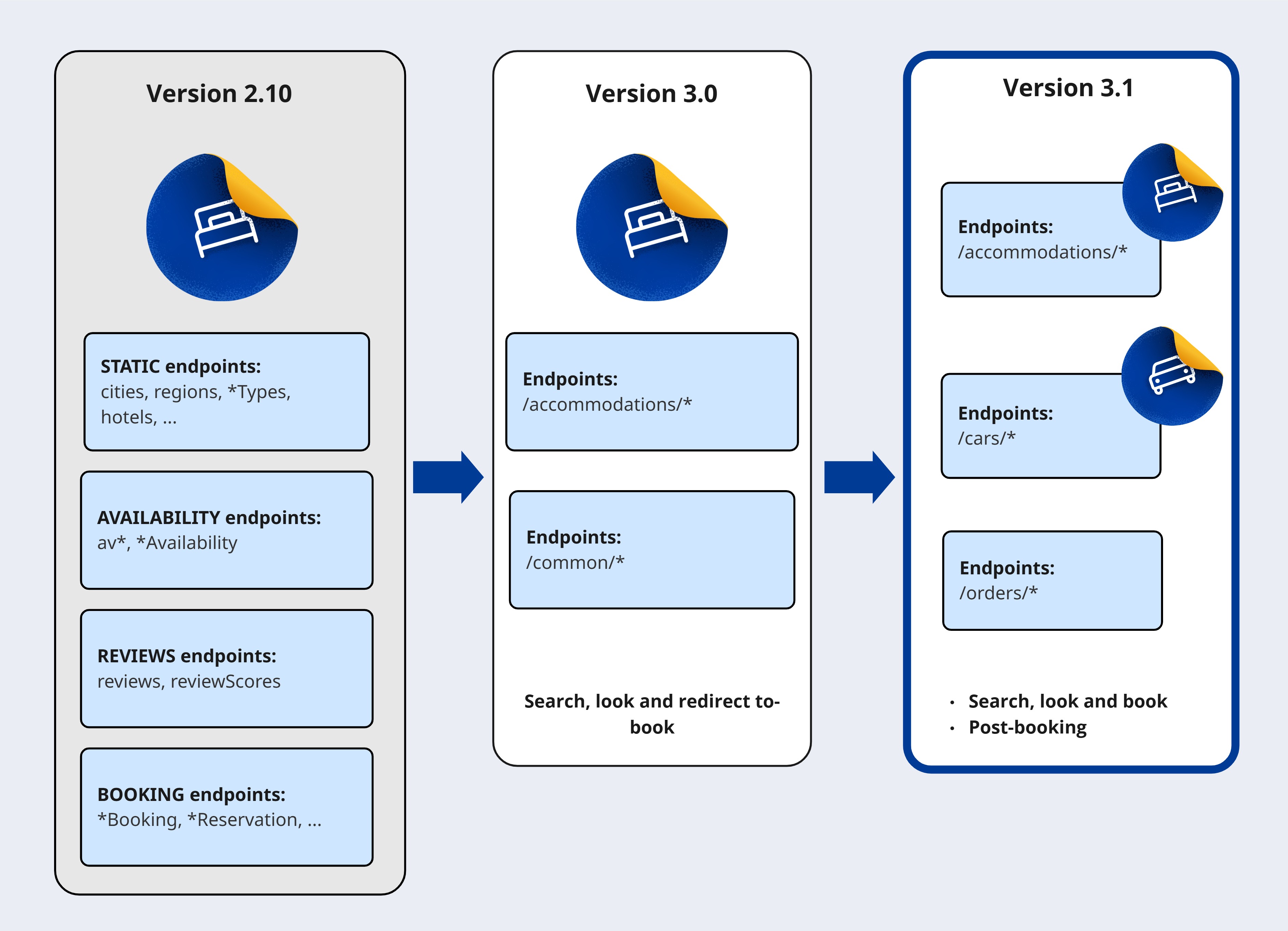
In v2, the API employed a monolithic design tailored specifically for the accommodation vertical of the travel industry.
Version 3 introduces a modular architecture that:

Version 3.0 introduces two new sets of endpoints:
✅ /accommodations/ endpoints - which focus on the accommodation vertical within the travel market.
✅ /common/* endpoints - which provide generic, cross-vertical information about locations (such as countries, cities, landmarks, and airports), payments (currencies and payment methods), and languages.
These endpoints are designed to support the Search, look and redirect-to-book integration type.
Version 3.1 includes:
which support common order processing and management functionality across verticals.
These endpoints extend the API's capabilities to include Search, look and book and Post-booking management integration types.
✅ This version also includes the possibility of using other verticals.
- Including the car rentals endpoints collection.
In v3, each call to a Demand API endpoint must identify an API user that is authorised to access that endpoint.
An API user is a unique pairing of your partner id and one of your affiliate ids.
To enable an API user to access the Demand API, you must do the following:
- Generate an API key (HTTP bearer token) for your partner account. Bearer tokens provide greater security than the basic authentication method used in v2.
- Include your API key and the appropriate
affiliate idin the header of every request.
Refer to the Authentication and authorisation guide for further details.
The following table compares the structure of v2 and v3 endpoints.
| version 2 | version 3 | |
|---|---|---|
| Protocol | https:// | https:// |
| Base URL - production | distribution-xml.booking.com/2.x and secure-distribution-xml.booking.com/2.x | demandapi.booking.com/3.x |
| Base URL - testing | Uses query parameter: test_mode=1 | demandapi-sandbox.booking.com/3.x |
| Authentication | Basic authentication | Bearer token |
| Methods | GET, POST | POST |
| Request parameters | URL query parameters | Request body fields |
| Response format | JSON or XML | JSON |
| Response identifier (example) | "ruid": "UmFuZ...hC6wFNTY=" | "request_id": "01gy9yzwp8ybkmp3hax0fsdqyk" |
See the differences in a simple search call on accommodation endpoint:
GET https://distribution-xml.booking.com/2.10/hotelAvailability?
     city_ids=-2140479
     &guest_country="nl"
     &room1="A,A"
     &checkin="2023-08-15"
&checkout="2023-08-16"POST https://demandapi.booking.com/3.1/accommodations/search
{
"city": -2140479,
"booker": {
"platform": "desktop",
"country": "nl"
},
"checkin": "2025-11-15",
"checkout": "2025-11-18",
"guests": {
"number_of_rooms": 1,
"number_of_adults": 2
}
}An accommodation booking created in v2 is uniquely identified by a reservation_id, which is returned in the processBooking response. For example:
{
  "result": {
    "reservation_id": "1234567890"
    ...
An accommodation booking created in v3 has two identifiers, returned in the /orders/create response:
order id | The order id is the primary identifier of parent order that the accommodation (or other services) booking is part of. | You should use when working with bookings (as part of orders) in v3. |
reservation id | The reservation id is provided solely for backward compatibility with V2. | This way, you can still access orders created using V2 after you have migrated your integration to v3. |
For example:
{
  ...
  {
    "accommodation": {
      "order": "509430129718799",
      "reservation": 2444627607
...The reservation id may be removed in a later version of the Demand API.
The Error handling guide describes what errors can occur when calling v3 endpoints and what you should do to avoid or fix them.
Note that version 3 reports errors differently to version 2:
The endpoint now returns a HTTP error status code (4_xx_ for a client-side error or 5_xx_ for a server-side error).
A response body is only returned with a HTTP 400 code, or with some 5_xx_ codes.
The response body contains further details about the error, but uses a different structure to v2 - see the Error handling section for more details.
request_idis the unique identifier for the response - This replaces theerrors.ruididentifier used in a v2 error response.error.ididentifies the sort of error and can be consider the error code - It replaces theerror.codeanderror.nameused in v2.message- Describes the error and likely solution.
For example:
{
    "request_id": "01gw5aaj8dkh7fvgwa7phs916x",
    "errors": [
        {
            "id": "missing_parameter",
            "message": "Parameter 'checkin' is missing."
        }
    ]
}With Demand API version 3 you should update your error handling logic to use errors.id instead of errors.code or errors.name.
New common endpoints have been included so can be used acrosss verticals.
The following new location endpoints are available in version 3:
| Endpoint | Description | In v2 |
|---|---|---|
| /common/locations/airports | This endpoint returns a list of airports, giving each airport's International Air Transport Association (IATA) code (id) and name (name). | In version 2, these codes were only available in the documentation, not from the API itself. |
| /common/locations/landmarks | This endpoint returns a list of geographical landmarks, giving for each one a unique id its name and coordindates. |
{
    "data": [
        ...
        {
            "id": "CDG",
            "name": {
                "fallback": "Paris - Charles de Gaulle Airport",
                "en-gb": "Paris - Charles de Gaulle Airport"
            }
        },
        ...
    ]
}{
"data": [
...
{
"id": 1,
"name": {
"fallback": "station-amsterdam-centraal",
"en-gb": "Amsterdam Central Station"
},
"coordinates": {
"latitude": 52.378281,
"longitude": 4.900070
}
},
...
]
}For more information see the following links in the API Reference:
The /common/languages endpoint returns a list containing the language code (id) and name of every language for which translations are available from the Demand API.
In version 2, these language codes were only available in the documentation, not from the API itself.
For example:
{
   "data": [
       {
           "id": "ar",
           "name": "العربية"
       },
       ...
       {
           "id": "en-gb",
           "name": "English (UK)"

       },
       ...
       {
           "id": "zh-cn",
           "name": "简体中文"
       },
    ]
}
You can use these language codes with any endpoint that provides translatable data in its response:
In the request, specify the language(s) you want to return.
In the response, identify the language used in any translated string.
In v2, you could only get response data from the hotels endpoint in a single language (using the language query parameter).
In v3, you can now get response data from the equivalent /accommodations/details endpoint in multiple languages in the same call. If your application supports several different languages, using v3 can result in a significant reduction in the number of calls you need to make to obtain your content.
Version 3 uses a new languages request field, in which you can specify an array of language codes. For example, to get response data in British English, Spanish, Arabic and Chinese, specify the following in the request:
{
    "languages": [
        "en-gb",
        "es",
        "ar",
        "zh-cn"
    ]
}
You can get the list of available language codes from the new v3 /common/languages endpoint.
In the response, each translatable field will be returned in each of the requested languages for which a translation exists. For example:
"name": {
    "ar": "كوخ حديقة \n\n",
    "zh-cn": "花园小屋 ",
    "en-gb": "Garden Cottage",
    "es": "Casa de campo Garden"
},
The following V2 endpoints also use the language parameter, but their v3 equivalents do not use the languages request field:
blockAvailabilityandhotelAvailability- The v3 equivalents of these endpoints (accommodations/availabilityandaccommodations/search) do not return any translatable content, so do not provide thelanguagesrequest field.reviewsandreviewScores- These endpoints use thelanguageparameter differently.
To allow you to redirect a traveller from your application to Booking.com to complete a booking, several Demand API endpoints return URLs to specific Booking.com accommodation pages.
For reporting and attribution purposes, these URLs should include the affiliate id that the request is to be tracked against:
In version 2, you could specify the affiliate ID to be used in the
affiliate_idrequest parameter. This parameter is not supported in V3.In version 3, these URLs automatically include the affiliate id specified in the
X-Affiliate-Idheader in the request.- This makes it easier for partners who have multiple affiliate ids to track redirections on the affiliate, rather than partner, level.
See the Authentication guide for more details
You should modify your code as required to use the new mechanism.
In the table below:
The version 2 endpoints that return response fields containing redirection URLs, and the names of the returned fields.
- If the
affiliate_idrequest parameter was specified, these fields will contain a query parameter containing thataffiliate_idvalue.
- If the
The equivalent v3 endpoints that return response fields containing redirection URLs, and the names of the returned fields.
- These fields will contain a query parameter containing the value of the affiliate id used to make the request.
| v2 endpoint | Returns | Equivalent v3 endpoint | Returns |
|---|---|---|---|
| autocomplete | url | Not available in v3 | - |
| blockAvailability | deep_link_url,hotel_url | /accommodations/availability | deep_link_url,url |
| hotelAvailability | deep_link_url,hotel_url | /accommodations/search | deep_link_url,url |
| hotels | deep_link_url,hotel_url | /accommodations/details | deep_link_url,url |
| reviews | hotel_url | /accommodations/reviews | url |
| reviewScores | hotel_url | /accommodations/reviews/scores | url |
The affiliate ID is appended to each redirection URL in the aid query parameter. For example:
{
   ...
   "deep_link_url": "booking://hotel/10004?affiliate_id=956509",
   ...
   "url": "https://www.booking.com/property/nl/testHotel-1.html?aid=956509",
   ...
}If you want to use a different affiliate ID to the one used to make the request, you can still modify the URL given in the response before using it to redirect.
- Pagination - version 3 offers an easier way to use mechanism for paginating results.
Refer to the Pagination guide for more details
Support for long stays -Searches can now return data for long-stay bookings.
- In an /accommodations/search request, the
checkoutdate can now be up to 90 days after thecheckindate. - In a v2
hotelAvailabilityrequest, thecheckoutdate has to be within 30 days of thecheckindate.
- In an /accommodations/search request, the
Improved experience for more complex room needs, such as group and family searches.
Check the child policies and family use cases sections for examples and further information.
Accommodation integration
Are you migrating from v2 to v3? Check here to understand and construct the main migration requirements for your particular accommodation integration.
Car rental integration
If you are migrating from previous Car rental XML API to v3.1 Demand API car rental collection - Explore here the new API design and mapping information.