Use the following guidelines to display discounts and deals correctly in your application.
When querying accommodation availability or search results, discount information is returned in the products.deal object of the API response.
Use this information to clearly and accurately show travellers that a product includes a discount.
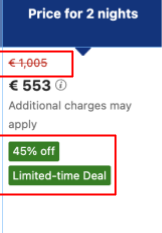
If the response includes a discount_percentage, always display the original public_price alongside the discounted price. The original price should be visually de-emphasised (e.g. with a strikethrough) to highlight the savings.
Only show discounts to eligible travellers. For example:
mobile_ratediscounts should only be visible to users on mobile devices.logged_in_dealsshould be shown only to authenticated users who meet the eligibility requirements.
Always display prices in the correct local format:
- Use the appropriate currency symbol and code (e.g. € for Euros).
- Format prices according to local conventions, including decimal and thousand separators.
- Consider both the user’s location and the property's location when displaying geo-specific rates.
{
  "currency": "EUR",
  "products": [
    {
      "deal": {
        "discount_percentage": 20,
        "public_price": 150.00,
        "tags": ["limited_time_deal"]
      },
      "price": {
        "book": 120.00
      }
    }
  ]
}
If the response from the /accommodations/search endpoint includes the following deal:
{
  "currency": "EUR",
  "products": [
    {
      "id": "xxxxxxxx_x_xxxxxxxxx_x_x_x",
      "deal": {
        "discount_percentage": 45,
        "public_price": 1005.00,
        "tags": ["limited_time_deal"]
      },
      "price": {
        "book": 553.00
      }
    }
  ]
}
You could display the offer like this on the search results page:
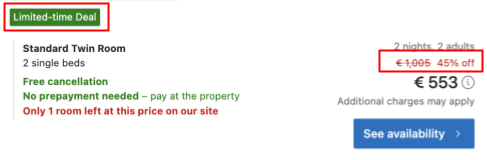
If the same data is returned from the/accommodations/availability endpoint, you can display it on the property page like this:
You may display logged_in_deals (closed-user-group discounts) only to users who meet Booking.com’s eligibility criteria. These deals are not available to anonymous users or unauthenticated users.
To be eligible for logged_in_deals, travellers must:
- Be signed in with a valid account.
- Meet any additional deal-specific requirements, such as:
- Genius membership.
- Participation in a targeted campaign.
To correctly displaylogged_in_deals:
Require authentication - Only display
logged_in_dealsto users who are authenticated on your platform and/or linked to a Booking.com account.Display deals clearly - Highlight these deals in your user interface with clear labelling (for example, “Special deal” or “Logged-in discount”) so travellers understand why the offer is available to them.
Never expose to unauthenticated users - Never expose
logged_in_dealsto users who are not signed in. These deals are exclusive and must not be shown in public-facing or anonymous environments.Comply with Booking.com’s policies - Ensure you follow all technical and contractual requirements provided by Booking.com regarding deal visibility, rate confidentiality, and user targeting.
If no discount applies to a product, the products.deal object will be set to null.
Your application should handle this scenario gracefully. Do not display any discount indicators or strike-through pricing.
{
  "currency": "EUR",
  "products": [
    {
      "id": "xxxxxxxx_x_xxxxxxxxx_x_x_x",
      "deal": null,
      "price": {
        "book": 100.00
      }
    }
  ]
}
Avoid showing any discount-related visuals or text if no deal is present. This prevents user confusion and maintains a clean UI.
- For further details on deals and rates refer to our dedicated guide.
- Refer to the Search for accommodation guide for instructions on constructing requests.
- Explore the Search use cases section for practical examples.