Learn how cancellation policies work throughout the booking lifecycle and how to retrieve cancellation rules, schedules, and applicable fees for different travel services.
Cancellation policies determine:
- whether a traveller can cancel a reservation;
- when cancellation is permitted;
- whether a cancellation fee applies; and
- how that fee is calculated.
The Demand API provides progressively richer cancellation information as the traveller moves through the booking journey.
Booking stage | Endpoint | Information returned |
|---|---|---|
| Pre-booking | /search /availability | Cancellation policy type and, where supported, the free cancellation deadline. |
| Booking | /orders/preview | Complete cancellation schedule and applicable cancellation fees before the booking is confirmed. |
| Post-booking | /orders/details/* | Current cancellation eligibility, cancellation status, latest cancellation schedule, and any fees charged. |
Different travel services support different cancellation models.
| Travel service | Supported policies |
|---|---|
| Accommodation | Flexible (free_cancellation), Partially refundable (partially_refundable / special_conditions), Non-refundable |
| Car rental | Free cancellation, Non-refundable |
| Standalone car insurance | No standalone cancellation policy. Eligibility depends on the insurance status and the associated car rental reservation. |
Accommodation reservations support three cancellation policy types.
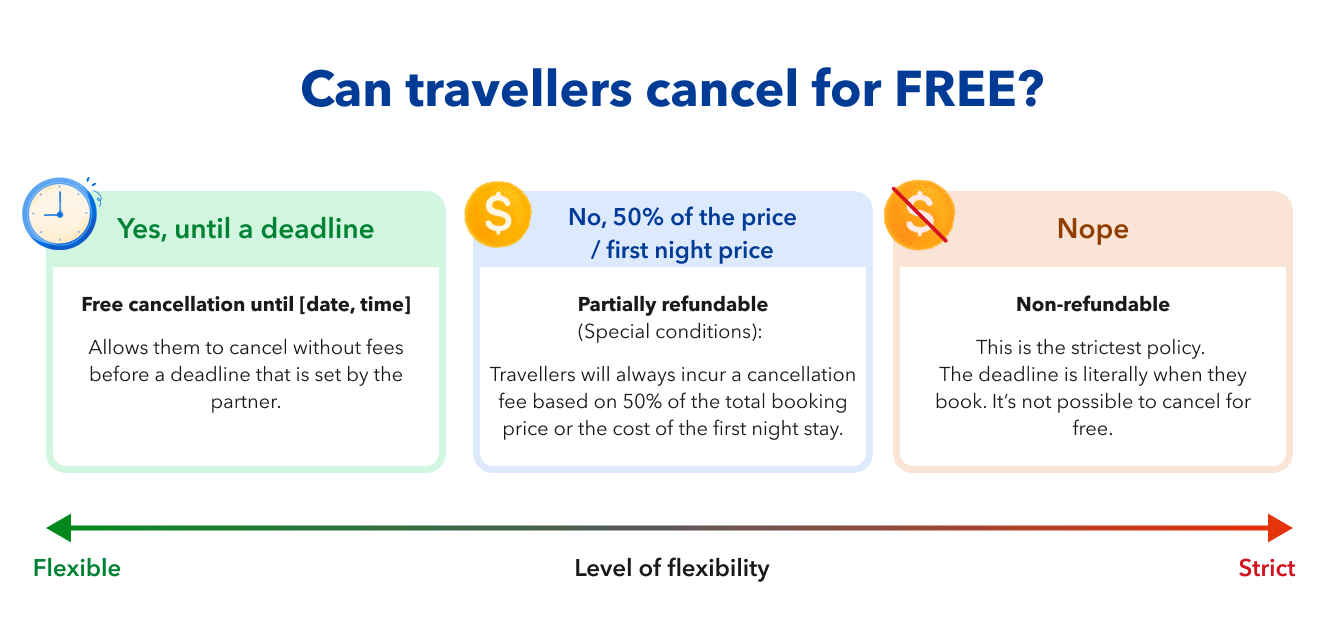
Travellers can cancel free of charge until a specified deadline. Typical examples include:
- 24–48 hours before check-in.
- 7 days before arrival.
- 12:00 on the day of arrival.
The accommodation provider defines the free cancellation deadline, which varies by property and rate.
This policy provides the greatest flexibility for travellers.
Bookings can be cancelled, but a cancellation fee always applies.
- In Demand API v3.1 this policy type is returned as
special_conditions. - In Demand API v3.2 it is returned as
partially_refundable.
Depending on the property's policy, the traveller may be charged:
- The first night's stay;
- 50% of the total booking price; or
- Another amount defined by the accommodation provider.
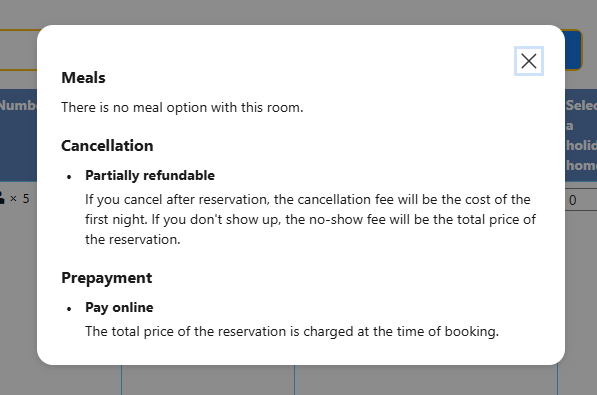
Unlike flexible policies, the complete cancellation schedule is not available during search.
It becomes available during the booking process through /orders/preview.
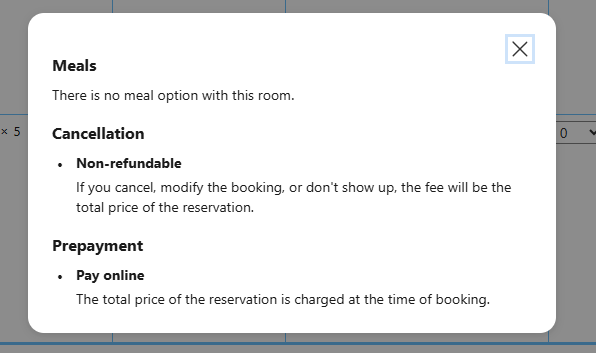
Third-party rates accommodation reservations only support flexible and non-refundable cancellation policies.
Travellers pay the full cancellation fee from the moment the reservation is confirmed, unless local regulations require otherwise.
These policies are commonly associated with discounted or promotional rates.
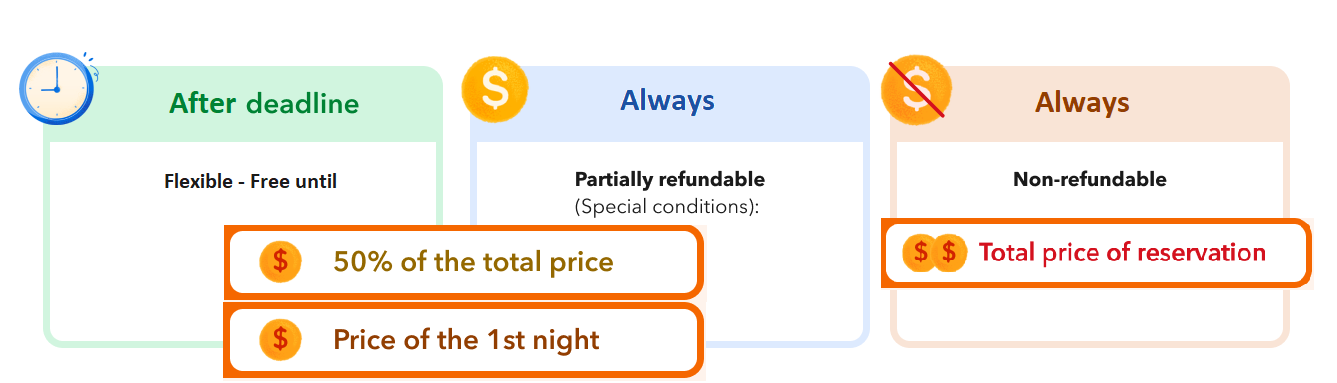
There are 3 different fees that can be applied:
v3.2 Beta
Booking.com provides a default cancellation policy for most car rentals:
- If travellers cancel more than 48 hours before the scheduled pick-up time, they receive a full refund.
- Cancelling within 48 hours of the scheduled pick-up time (including at the rental counter), they receive a refund minus the cost of 3 rental days.
- Cancelling after the scheduled pick-up time, or if they do not collect the vehicle, no refund is available.
However, always rely on the cancellation policy returned by the API rather than assuming the default policy applies.
The API returns:
- the cancellation policy type;
- one or more cancellation windows;
- whether cancellation is free during each window; and
- any applicable cancellation fee.
The schedule object is the source of truth for car rental cancellation rules.
v3.2 Beta
Standalone car insurance does not have its own cancellation policy or cancellation schedule.
Instead, cancellation eligibility depends on:
- the current insurance status; and
- the associated car rental reservation.
Before allowing travellers to cancel insurance, verify that:
- An insurance policy exists.
- The insurance policy has not already been cancelled.
- The associated car rental reservation is still
confirmed.
You can verify these conditions by retrieving the latest car order details.
If the associated car rental reservation is cancelled, the insurance policy is cancelled automatically.
Cancellation fees vary depending on the travel service and the applicable cancellation policy.
The Demand API returns the applicable cancellation fees as the traveller progresses through the booking journey.
| Travel service | Cancellation fee information |
|---|---|
| Accommodation | Cancellation fees become progressively available throughout the booking lifecycle. The complete cancellation schedule is returned by /orders/preview and /orders/details/accommodations. |
| Car rental | The applicable fee is returned by /orders/details/cars/live within the policies.cancellation.schedule object. |
| Car insurance | Insurance policies do not expose a separate cancellation fee schedule. |
- Always display the cancellation fee returned by the API rather than calculating it yourself.
- Inform your travellers about the applicable fees during the booking process.
During the search phase, the API returns a simplified view of the cancellation policy.
This allows travellers to understand the available cancellation flexibility before selecting a travel service.
Cancellation fees are not yet disclosed at this stage.
When using the /search or /availability endpoints, the response includes the cancellation policy assigned to each accommodation product.
Field | Description |
|---|---|
| Cancellation policy applied to the accommodation product. One of |
free_cancellation_until | Date and time until which the reservation can be cancelled free of charge. Returns null if free cancellation is not available. |
All timestamps are returned in UTC using the ISO 8601 format.
On this request, for this property there is a flexible cancellation policy, and travellers can cancel for free until 2025-10-06T21:59:59+00:00
"policies": {
  "cancellation": {
    "free_cancellation_until": "2025-10-06T21:59:59+00:00",
    "schedule": [
      {
        "from": "now",
        "price": 0
      },
      {
        "from": "2025-10-06T22:00:00+00:00",
        "price": 4716.9
      }
    ],
    "type": "free_cancellation"
  }
}In this case, the cancellation policy type is "partially_refundable (or special_conditions in v3.1) and the free_cancellation_until field is "null". This means there is no free cancellation and a fee may apply.
"products": [
  {
    "number_available_at_this_price": 10,
    "policies": {
      "cancellation": {
        "free_cancellation_until": null,
        "type": "special_conditions"
      },
      "meal_plan": {
        "meals": [],
        "plan": "no_plan"
      },
      "payment": {
        "timings": [
          "pay_at_the_property",
          "pay_online_later",
          "pay_online_now"
        ]
      }
    },
    "price": {
      "book": 204.00,
      "total": 204.00
    },
    "room": 1050736002
  }
]
At this stage fees are not yet disclosed for special conditions policies. Use the orders/preview endpoint to get further details on fees and schedules.
When a product has a "non_refundable" type of policy, the "free_cancellation_until" field returns null, as this is not applicable.
{
  "products": [
    {
      "id": "1000420_95127794_2_0_0",
      "children": [],
      "deal": null,
      "number_of_adults": 2,
      "policies": {
        "cancellation": {
          "free_cancellation_until": null,
          "type": "non_refundable"
        },
        "meal_plan": {
          "meals": [],
          "plan": "no_plan"
        },
        "payment": {
          "timings": [
            "pay_at_the_property"
          ]
        }
      }
    }
  ]
}
v3.2 Beta
When searching for cars using the /search and /availability (Beta) endpoints, you can check a simplified version of the cancellation policy.
Field | Description |
|---|---|
| Cancellation policy applied to the car. One of |
policies.cancellation.details | Information describing the free cancellation window.
|
On this request, for this car there is a flexible cancellation policy, and travellers can cancel free of charge up to 48 hrs before pick up.
"policies": {
      "cancellation": {
        "type": "free_cancellation",
        "details": {
          "context": "before_pickup",
          "duration": "PT48H"
        }
},For non_refundable cancellation policies:
"policies": {
      "cancellation": {
        "type": "non_refundable",
        "details": {
          "context": "null",
          "duration": "null"
        }
      },
Car rentals do not support "special conditions" or "partially_refundable".
Once the traveller has selected a product, /orders/preview provides the complete cancellation schedule before the booking is confirmed.
This endpoint is the authoritative source for the cancellation terms presented before booking confirmation.
Accommodation reservations return the cancellation schedule in:
data.accommodation.products[].policies.cancellation
Car rentals return the cancellation schedule in:
data.car.policies.cancellation
Refer to the Create orders guide for examples.
These are the fields included in the data.accommodation.products.policies.cancellation response:
| Field | Description |
|---|---|
From | When a cancellation rule becomes effective. now means the policy is effective immediately at the time of booking. |
price | Cancellation fee that applies from that point onwards. |
In the following example:
"products": [
  {
    "id": "1000420_278556531_2_0_0",
    "deal": null,
    "policies": {
      "cancellation": [
        {
          "from": "now",
          "price": {
            "accommodation_currency": 0,
            "booker_currency": null
          }
        },
        {
          "from": "2026-12-08T23:00:00+00:00",
          "price": {
            "accommodation_currency": 177.65,
            "booker_currency": null
          }
        }
      ]
    }
  }
]
from: "now"- Indicates that from the moment of the booking, the traveller must pay the indicated price.- Here, the
price.accommodation_currencyis 0, reflecting a free cancellation policy.
- Here, the
The
fromdate specifies the deadline after which travellers will incur a cancellation fee (in this example 177.65)- This indicates that travellers can cancel for free until 2026-12-08T23:00:00+00:00.
- After this point, the indicated cancellation fee applies.
In the following example the from.now field indicates that from the moment of the booking, the traveller must pay the indicated fee for cancellations (170).
{
  "id": "1000420_95127794_2_0_0",
  "policies": {
    "cancellation": [
      {
        "from": "now",
        "price": {
          "accommodation_currency": 170,
          "booker_currency": null
        }
      }
    ]
  },
  "price": {
    "base": {
      "accommodation_currency": 162.98,
      "booker_currency": null
    },
    "extra_charges": {
      "conditional": [
        {
          "charge": 3,
          "condition": 30,
          "mode": "per_stay",
          "percentage": null,
          "total_amount": {
            "accommodation_currency": 10,
            "booker_currency": null
          },
          "unit_amount": null
        }
      ]
    },
    "total": {
      "accommodation_currency": 195.06,
      "booker_currency": null
    }
  }
}After the booking has been created, retrieve the latest order details to determine:
- whether cancellation is still possible;
- the latest cancellation schedule;
- any applicable cancellation fees; and
- whether the reservation has already been cancelled.
In this example the cancellation_details field is null because the order has not yet been cancelled, and the check-in date is 2026-08-24.
{
  "accommodation_order_references": [],
  "cancellation_details": null,
  "checkin": "2026-08-24",
  "checkout": "2026-08-26",
  "commission": {...},
  "products": [
    "policies": {
    "cancellation": [
      {
        "from": "2026-08-22T14:22:43+00:00",
        "price": {
          "accommodation_currency": 45.00,
          "booker_currency": 38.35
        }
      }
    ]
  },
  "status": "booked"
}
- Free cancellation is available until two days before check-in.
- From 2026-08-22 (UTC), the traveller will be charged the stated amount (38.35)
In this example, there is a fee applied to the cancellation.
{
  "request_id": "01fr9ez700exycb98w90w5r9sh",
  "data": [
    {
      "id": "509430129718799",
      "reservation": "12345678",
      "status": "cancelled",
      "checkin": "2025-12-10",
      "checkout": "2025-12-18",
      "cancellation_details": {
        "at": "2025-12-09T00:00:00+00:00",
        "fee": {
          "accommodation_currency": 170.01,
          "booker_currency": 186.87
        },
        "original_total_price": {
          "accommodation_currency": 170.01,
          "booker_currency": 186.87
        }
      }
    }
  ]
}When using the orders/details/cars/live in Beta version.
{
  "cancellation": {
    "type": "free_cancellation",
    "schedule": [
      {
        "from": "2026-10-14T10:00:00Z",
        "to": "2026-10-17T09:59:59Z",
        "free_cancellation": true,
        "price": null
      },
      {
        "from": "2026-10-17T10:00:00Z",
        "to": "2026-10-19T10:00:00Z",
        "free_cancellation": false,
        "price": {
          "display": {
            "value": 25.00,
            "currency": "USD"
          },
          "pay": {
            "value": 22.73,
            "currency": "EUR",
            "timing": "pay_online_now"
          }
        }
      }
    ]
  }
}
/orders/details/cars/live is currently available in Beta and will replace /orders/details/cars in a future stable release.
In this example:
- Cancellation is free until 2026-10-17T09:59:59Z.
- From 2026-10-17T10:00:00Z onwards, a cancellation fee applies.
- The fee is returned in both the traveller's display currency and the payment currency.
Always use the schedule object to determine whether cancellation is currently allowed and whether fees apply. It contains the most accurate and up-to-date cancellation rules for the reservation.
{
  "data": [
    {
      "reservation": "11223344",
      "status": "confirmed",
      "insurance": [
        {
          "policy_reference": "1a8192e7-cc40-41a0-9bc1-801d95dc0c23",
          "status": "confirmed"
        }
      ]
    }
  ]
}
In this example:
- The car rental reservation is still active (
confirmed). - The insurance policy is also active (
confirmed). - The insurance policy is therefore still eligible for cancellation.
If the associated car rental reservation is cancelled, the insurance policy is cancelled automatically. There is no separate cancellation window or fee schedule for standalone car insurance.
When displaying cancellation information to travellers:
✅ Always retrieve the latest cancellation information before allowing a cancellation.
✅ Always use the cancellation policy and fees returned by the API rather than calculating them yourself.
✅ Display any applicable cancellation fee before the traveller confirms the cancellation.
✅ Refresh cancellation information immediately before submitting the cancellation request, as eligibility and fees may change over time.
✅ For car rentals, always use the schedule object as the source of truth.
✅ For standalone car insurance, verify both the insurance status and the associated car rental reservation status before allowing cancellation.
- For a better understanding of the cancellation process, check the Handling cancellations guide.
- Refer to the Orders section for instructions on how to use the orders/details and orders/preview endpoints.
- You can also check the workflow for pre-booking and booking phases in the Try out full guide.